
Replenish DT Shop Wallet with GrabPay
How To: Replenish DT Shop Wallet with GrabPay
- Go to the DT Shop Wallet page
Navigate to:
https://dtshop.dtone.com/wallet/
Under MY WALLET, click on INSTANT PAYMENT.
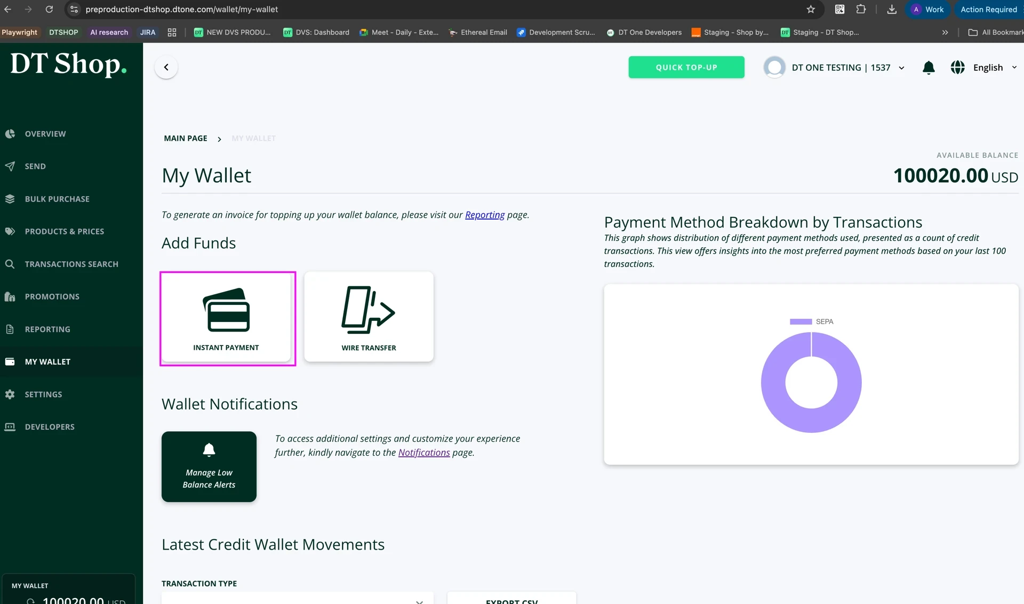
- Enter the amount to replenish your wallet
Enter the desired amount and click NEXT.
- Select GrabPay as the payment method
In the Proceed to Payment section, expand the GrabPay option.
Click PAY.
- Complete the payment using GrabPay
You will be redirected to GrabPay to authorize the transaction.
Follow the instructions in the Grab app or payment interface to confirm the payment.
- Payment confirmation
Once the payment is submitted, the system will display a transaction confirmation screen showing the transaction status.
- View the transaction in Wallet History
Go to:
Reporting → Wallet History
The transaction will appear with:
Method: GrabPay
Value: Transaction amount
Status: Successful (once processed)
- Email confirmation
A payment confirmation email will be sent to your registered email address after the transaction has been processed.
Updated 5 months ago